
















































Flip Spot
Flip Spot is a 3D physics based trick game where players will need to complete aerial flips and land accurately in a certain area. Instead of navigating a complex track, each level focuses entirely on a single critical moment: the jump, the mid-air rotation, and the landing posture.
Who published Flip Spot?
How to play Flip Spot
Your mission in Flip Spot is to guide your character safely from the starting point to the landing zone. But the space between those two points is a void where all of the success depends on how much control you can maintain.
Beginning the jump
Each round begins on a raised platform or launch point. To prepare for the jump, hold the appropriate control button, then release it to launch your character into the air.
Once you're airborne, rapidly estimate the distance remaining and time your flip. This is a moment where precision matters more than speed.
Controlling mid-air rotation
Hold the control button while in flight to keep rotating. The longer you hold it, the more rotations you will perform; however, attempting too many spins isn't always the best strategy.
A simple flip that results in a clean, two-footed landing is far better than squeezing in an extra rotation only to crash in an uncontrolled heap. Pay close attention to your body orientation and specifically your feet as you approach the landing zone.
Landing safely
You must stop rotating early enough to allow your character time to return to an upright position before hitting the ground. If you keep flipping until the last second, it becomes very difficult to correct your posture.
You might have to play each level a couple of times to get the timing right. You can try the level again and experiment with how long you hold down your buttons. Every now and then a little tweak makes a previous fall a perfect landing.
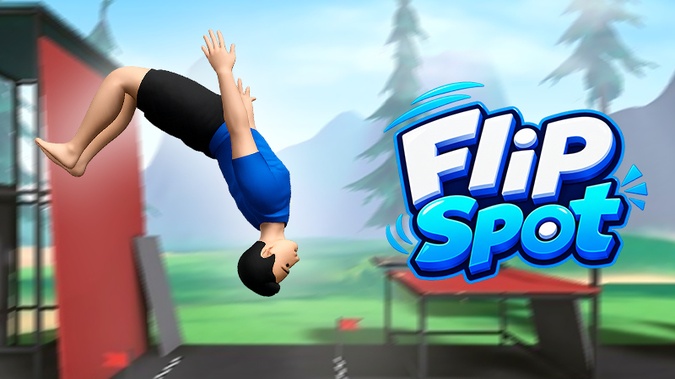
Flip Spot Highlights
• Perform aerial flips: Control your character's rotation after leaving the starting point.
• Precision landing challenges: Align your posture to land on your feet and complete the level.
• Diverse jump locations: Varying heights and distances create unique challenges.
• Fun physics mechanics: Every flip and landing depends on your timing.
• Simple controls: Just a few basic keys to jump and perform flips.
• Quick restarts: Retry immediately after a failure to refine your timing.
• 3D environments: Platforms, ramps, and elevated structures create a varied performance space.
Flip Spot Controls
On PC
• Space / W / Up Arrow: Jump while on the ground.
• Hold Space / W / Up Arrow while airborne to perform a flip.
• R: Restart the level.
• Esc: Pause the game.
On Mobile
• Press and hold the Up button: Prepare to jump.
• Release the button: Character jumps.
• Hold the Up button while airborne: Control the character's rotation.
Flip Spot: Tips for Playing Effectively
Check out the airtime
The time spent in the air will differ for each jump spot, depending on the height and the distance to the landing area. If you land in a new place, do not attempt to perform multiple flips immediately. On your first try, pay attention to how long it takes to fall, how far you have to go, and when it starts to fall. For example, if the character lands earlier than expected, next time shorten the amount of time you hold the button to avoid over-rotation.
Flip End Time
Holding the button longer doesn’t necessarily mean a higher score. The trick is to know when to stop it so the character bounces back up to standing before hitting the ground. If the character’s feet are pointing downwards but there is still a long way to the landing platform, keep adjusting instead of releasing the button too early. However, if your landing zone is directly below you, stopping the rotation early gives you more time to stabilize your posture.
Put a safe landing first
A spectacular flip is spectacular until the character lands awkwardly and has to start over. If you do not know how to do a level, then you should try to do the jump with only one or two simple rotations. Once you have judged the airtime, you can try to get more rotations on the next attempts . This is especially helpful for low platforms, where a slight miscalculation can cause the character to fall off.
Position of the feet, see
The feet are one of the most important visual cues to determine if the character is ready to land. When you spin, notice the direction of the feet rather than the number of spins. For example, if the character is nearing the end of a rotation but their feet are still pointing sideways, you may need a little more time to bring the body into an upright position. Conversely, if your feet are already pointing toward the landing zone, stop rotating to avoid an unintended extra spin.
Get a feel for each height
Higher starting points generally give you more airtime, but that doesn't mean every jump is easy. Try out different positions and memorize the sensation of rotation speed and fall duration. For instance, once you’re used to a high platform that allows for two or three spins, you’ll quickly realize that holding the button the same way on a lower platform might cause your character to spin too much.
Don't overdo the spins
After successfully pulling off a few flips, players often want to try continuous rotations for a more impressive performance. However, more spins make it harder to control your posture. If the landing zone is small, a simpler flip is usually the safer option. Only attempt extra spins when you are certain the height and airtime allow for them.
Get the most out of retries
If you fail at Flip Spot, you don't have to entirely change your strategy. Remember what happened on the last time. Did the character landed too early, or did not complete the rotation, or did land upside down? Then, for the next attempt, change slightly when you press or release the button. For example, if your character is still spinning halfway through a rotation while approaching the ground, releasing the button a little earlier may make for a more stable landing.
Conclusion
Flip Spot has fast challenges that are so addictive you’ll want to keep coming back. Time your moves perfectly, control your rotation and prove you can pull off spectacular flips before sticking the landing.
Discuss Flip Spot